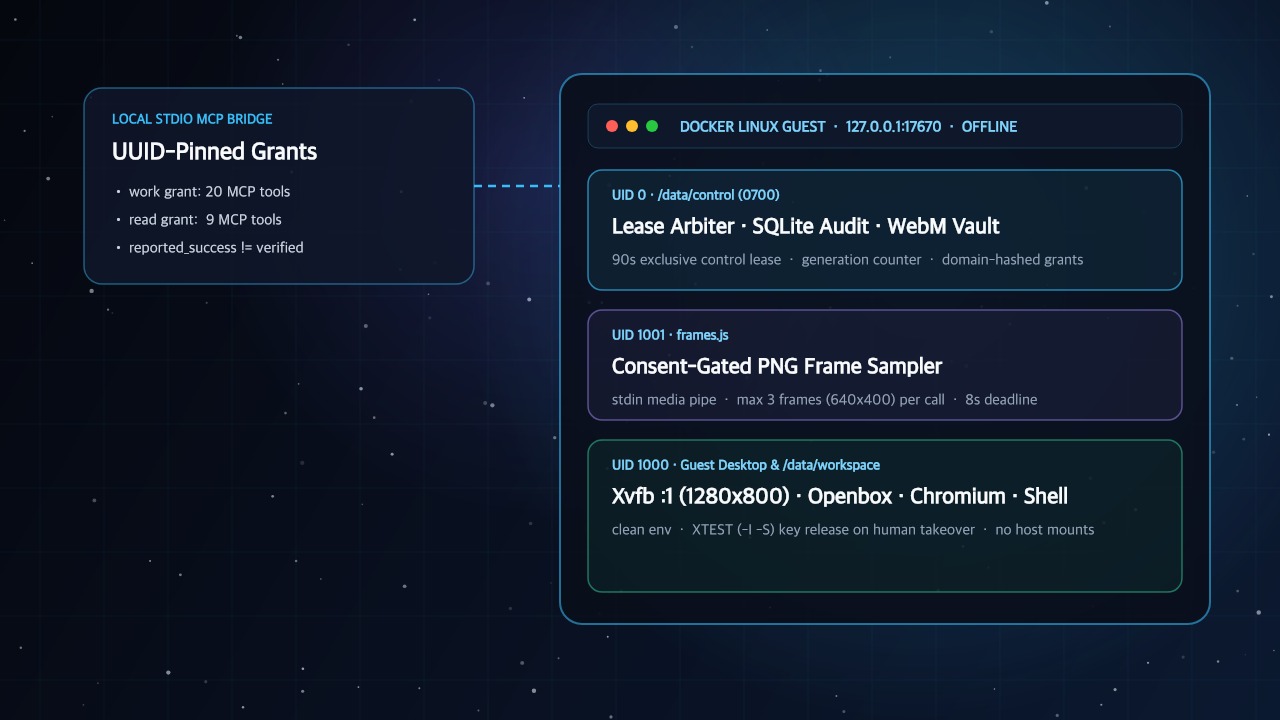
The problem with sharing your host desktop with an agent
Most computer-use tools ask you to hand over the machine you already work on. You grant macOS Accessibility permissions, expose a browser profile signed into production dashboards, or let a local shell tool read your home directory. That setup works for a three-minute demo, and it fails the moment you run agents alongside your daily work.
Sharing one desktop between a human operator and an autonomous agent creates two immediate hazards. First, the agent inherits your ambient authority, including SSH keys, cloud credentials, password-manager sockets, and active cookies. Second, you compete for the same cursor, keyboard focus, and window stack. If an agent clicks the wrong window while you switch tabs, your own session absorbs the mistake.
A remote cloud sandbox avoids local pointer collisions, but it introduces a new trade-off. You ship prompts, workspace files, and screen state to third-party infrastructure, and you pay for a container that idles between turns. Local coding harnesses such as Claude Code, Codex CLI, Cursor, and Gemini through Antigravity already speak the Model Context Protocol (MCP) over standard input and output (stdio). What those harnesses lack is a dedicated computer on your own machine that treats isolation, access control, human takeover, and verification as runtime rules.
Why local stdio MCP sits in front of an isolated Docker Linux desktop
Sendtry Computer (@sendtry/computer-mcp) separates the protocol transport from the execution environment. Your MCP client spawns a thin host bridge (computer-mcp mcp) over local stdio, so your coding harness needs no public webhook, no cloud relay, and no extra daemon. Behind that bridge, the CLI provisions a self-contained Docker Linux container and talks to it over a loopback HTTP port. The first computer uses port 17670.
Inside the container, the guest runs an Xvfb virtual framebuffer on display :1 at 1280x800, the Openbox window manager, Chromium, and a persistent /data/workspace directory. The owner console streams the display through noVNC. The container does not mount your host workspace, and it does not mount the host Docker socket. Raw VNC and Chrome DevTools Protocol (CDP) ports stay inside the container and are never published on host interfaces.
Process privileges inside the container follow a three-user split, so an agent command cannot tamper with the control plane that governs it:
- Root (
UID 0) owns/data/controlwith0700permissions: The control server, the SQLite Activity and task databases (activity.sqliteandoperations.sqlite), workflow files, and recorded demonstration videos (/data/control/videos/<UUID>.webm) are readable only by root. - The unprivileged guest user (
UID 1000andGID 1000) runs the desktop and tools:Xvfb, Openbox, Chromium,/data/workspacefile operations, andterminal_runshell commands run asUID 1000with a reduced environment. Work and owner credentials stay in the root control process. - A dedicated media user (
UID 1001) extracts analysis frames: When an owner consents to workflow analysis, a helper process (frames.js) runs asUID 1001and receives video bytes over standard input, soUID 1000guest processes cannot read recordings from disk.
The network is offline by default. When you create a computer without flags, Docker Compose attaches the guest to an internal network with no route to the internet. If a workflow needs package downloads or public websites, you opt in with --network internet when you create the computer. Internet mode also reaches LAN and host services, so it is not an outbound firewall. Network exposure becomes a decision you make for each computer, not a side effect of starting a container.
UUID pins keep each agent on the right computer
When you run several agents across personal projects and client repositories, friendly names like default or staging become dangerous. If you switch your CLI default from one computer to another while an agent session is mid-task, a name-based bridge could send file writes or shell commands to the wrong machine.
Sendtry Computer gives every machine two UUIDs: a computerId and a workspaceId for its data volume. Each computer also gets its own host catalog entry, Docker Compose project, Docker network, persistent volume, and loopback port.
Running computer-mcp use <name> changes only the default for CLI commands you type yourself. Every generated MCP client configuration pins the absolute Node executable, the CLI path, and one private connection file. That file carries the computerId, the workspaceId, and the access level. Before a tool runs, the runtime checks that both IDs match the running container. If a configuration points at the wrong computer or a stale workspace volume, the bridge rejects the call before anything changes.
Revocable named grants enforce least privilege per client
A single shared API token makes auditing impossible once you connect more than one client. If Claude Code, Codex CLI, and Cursor share one secret, you cannot tell which client ran a shell command, and you cannot cut off one client without breaking the others.
Sendtry Computer replaces shared tokens with named grants that you create with computer-mcp connection create. Each grant binds a label (such as claude-work or cursor-audit) to one computer and one of two access levels:
- Named
readgrant (9tools): Exposescomputer_info,browser_snapshot,desktop_screenshot,files_list,files_read,workflow_list,workflow_get,task_list, andtask_get. Areadclient can inspect the screen, read workspace files, and audit task history without a control lease and without changing state. - Named
workgrant (20tools): Adds 11 tools for tasks, leases, actions, and Teach proposals on top of the 9 read tools:task_start,task_finish,control_acquire,control_renew,control_release,browser_action,desktop_action,terminal_run,files_write,workflow_analyze, andworkflow_propose.
When you create a grant, the runtime stores only a domain-separated hash of the credential inside /data/control. The CLI writes the raw credential to a private host file with 0600 permissions under <catalog>/connections/<computerId>/<connectionId>.json and prints credential-free MCP configuration to standard output. You can paste that configuration into project settings without leaking secrets into shell history or repository files. When you run computer-mcp connection revoke, the runtime invalidates that one grant, and every other client keeps working.
Exclusive 90-second control leases and instant human takeover
Even inside an isolated guest, two actors cannot drive the mouse, keyboard, browser, and terminal at the same time. Concurrent clicks and interleaved shell commands corrupt application state and leave no clear causal trail.
The control plane holds one in-memory exclusive control lease per computer. A lease carries an owner identity, an owner kind (human or agent), a generation ID, and a 90-second expiry. While a work agent holds the lease, the host bridge renews it every 20 seconds, and the runtime checks every mutating tool call against the active lease generation. read tools skip the lease check, so a reviewer agent or the human operator can watch progress in real time.
Human authority always wins over agent authority. The guest runs two separate VNC endpoints behind the owner console: a view-only stream and an interactive input stream. When you watch an agent work in Screen, your browser uses the view stream. When you choose Take over, the runtime runs a fixed sequence:
- The control plane reserves the control transition and revokes the agent lease and its input channel.
- The runtime cancels any in-flight
terminal_run,browser_action, ordesktop_actioncall and waits for it to stop. - A one-second
UID 1000Python, Xlib, and XTEST helper (-I -S) runs against display:1to release any keys or mouse buttons the interrupted agent left pressed. - The runtime grants a new lease generation to you, and the console switches your browser to the interactive noVNC stream.
Because preemption runs inside the container control plane and clears X11 input state before you get the cursor, an interrupted agent cannot keep typing into your session. Side effects that already happened are not rolled back, so inspect partial work before you assign a new attempt.
Why agent reported_success is never the same as owner verified
Language models are unreliable judges of their own side effects. An agent can misread a page, overlook a requirement in the prompt, or assume a file write succeeded, and then announce that the task is complete. If the runtime marked a task as verified whenever the agent said so, the audit log would record agent optimism rather than system state.
Sendtry Computer splits task completion into two fields owned by two different actors. When a work agent runs an assigned task, task_start binds one attempt to that named grant, session, container boot, and lease generation. When the agent finishes, task_finish records its outcome (success, failure, or uncertain) and a summary, then releases only that attempt lease. The attempt moves to reported_success, failed, or interrupted. Owner verification stays null.
That failure shows why the data model never treats reported_success as verified. Only the human owner can record verified or rejected, after inspecting the live browser page, workspace files, and the Activity log in the owner console.
Teaching skills by demonstration without exposing raw video or secrets
Hand-written coordinate scripts defeat the purpose of a visual computer, while unrestricted access to continuous screen recordings creates a privacy and token-cost problem. Sendtry Computer adds a gated Teach loop. You demonstrate a workflow once in noVNC, and a vision-capable work agent helps you turn that demonstration into a reviewed, reusable skill.
When you record a demonstration in Teach & skills, the runtime captures an action trace without the values you type, plus an optional silent guest WebM video. Each clip is capped at 5 minutes and 20 MiB, with 200 MiB in total across recordings. The raw WebM file lives in /data/control/videos under UID 0, and MCP clients never receive it.
An agent can inspect a demonstration only after you choose Allow agent analysis in the console. That consent covers every work grant for that workflow. Even with consent, workflow_analyze does not stream raw video. The UID 1001 helper samples up to three 640x400 PNG frames per call, each capped at 512 KiB, under an 8-second deadline, and returns them with the trace. The agent then calls workflow_propose with a procedure, an expected result, uncertainties, and up to 16 named parameters. The call must pass the analyzed sourceRevision as expectedRevision, so a stale proposal fails.
The proposal stays a draft until you edit and confirm it in the console. After you confirm it, you can export a portable SKILL.md file pinned to the computerId, workspaceId, workflow UUID, and exact reviewed revision. Before a later task changes anything, the agent must call workflow_get and confirm status: ready, reviewed: true, and the matching revision.
Platform boundaries in v0.1.0
Version 0.1.0 has four platform boundaries:
- The guest is always Linux: The guest computer is a containerized Linux desktop (
Xvfb, Openbox, Chromium, a Linux shell, and/data/workspace). It runs on macOS, Windows, and Linux hosts through Docker Engine 28+ with Compose v2, using thedesktop-linuxcontext with Docker Desktop or thedefaultcontext on Linux. It does not provide isolated macOS or Windows guests, and it does not control native host apps. - The transport is local
stdio: The MCP server runs locally overstdioand talks to a loopback port on the same host. It targets one owner on one machine, not multi-tenant hosting on the public internet. - The network is offline by default: New computers start with no internet access unless you pass
--network internettocomputer-mcp init. - A container is not a VM: Containers share the host kernel, and Chromium runs without its own sandbox. This release targets an agent workspace you own, not hosting hostile code.